Top 5 Best Free Trading Journals (2026)
Looking for the best free trading journal in 2026? Compare Tradespad, TradesViz, UltraTrader, Notion/Excel templates, and Tradervue free options, limits, and who each pick is for.

Tradespad publishes this comparison and also offers a free trading journal. Features, free limits, and pricing for every tool named below can change. Confirm live plans on each vendor’s site. Notion and Excel templates vary by creator. This is educational, not financial advice.
Looking for the best free trading journal in 2026? Most “free” options are a short trial, a stocks-only sandbox, a spreadsheet you maintain yourself, or a free forever plan with hard caps. This guide ranks five free trading journal options you can start on $0/mo: four dedicated apps we have reviewed, plus Notion and Excel templates for traders who still want full control.
We scored each pick on usable free limits, analytics quality, import options, ease of review, and how fast a new trader can build a habit. Paid suites like TradeZella, TraderSync, and Edgewonk are strong products, but they do not belong on a free ranking when the free story is missing or trial-only.
Quick scoreboard for the best free trading journals in 2026. Free limits are snapshots and can change.
| Rank | Journal | Free plan | Best for | Upgrade from |
|---|---|---|---|---|
| #1 | Tradespad | Free forever | Daily journal + TradingView Charts backtesting path | $19/mo |
| #2 | TradesViz | Free forever | Deep analytics if you can handle a denser UI | €17/mo |
| #3 | UltraTrader | Free forever | Well optimized for mobile | $19/mo |
| #4 | Notion / Excel templates | Full customization with zero SaaS fee | Paid Notion / Microsoft plans if needed | |
| #5 | Tradervue | Free forever (limited) | Stocks and ETFs with a familiar brand | $29.95/mo |
5. Tradervue — Best free trading journal for stocks and ETFs

Tradervue is one of the oldest names in retail journaling. It still offers a real free forever plan, though it is easy to miss on the pricing page. Free is aimed at stocks and ETFs with a monthly import cap. Our review score: 7.0 / 10.
Paid Silver starts around $29.95/mo and Gold around $49.95/mo. That pricing feels steep next to newer journals when you mainly want clean reports and a mobile-friendly habit. Tradervue wins on brand familiarity and report layout more than on modern features.
- Strength: Clean browser UI and useful stock/options reporting
- Strength: Free tier exists for stocks and ETFs without a paid trial-only trap
- Trade-off: No modern backtesting workspace or strong mobile app story
- Trade-off: Weak MetaTrader / futures prop auto-sync compared with newer tools
- Skip if: You trade forex, futures prop, or want replay and strategy workspaces
What reviews say: On Trustpilot, Tradervue recently sits around 2.4 / 5 with about 10 reviews. The sample is small, but the tone is harsh: billing or cancellation friction and slow or unresponsive support show up often. Traders who stay usually praise the clean reports and brand familiarity, not the modern feature set. Treat public reviews as a caution signal and test support during the trial before you pay Silver or Gold.
Full write-up: Tradervue review.
Tradervue pricing snapshot. Confirm live rates before you buy.
| Plan | Price | Best for |
|---|---|---|
| Free | $0/mo | Limited stocks and ETFs (monthly import cap) |
| Silver | $29.95/mo | Unlimited trades, all asset classes, advanced reporting |
| Gold | $49.95/mo | Exit analysis, MFE/MAE, commissions, and risk reports |
4. Notion / Excel templates — Best free DIY trading journal
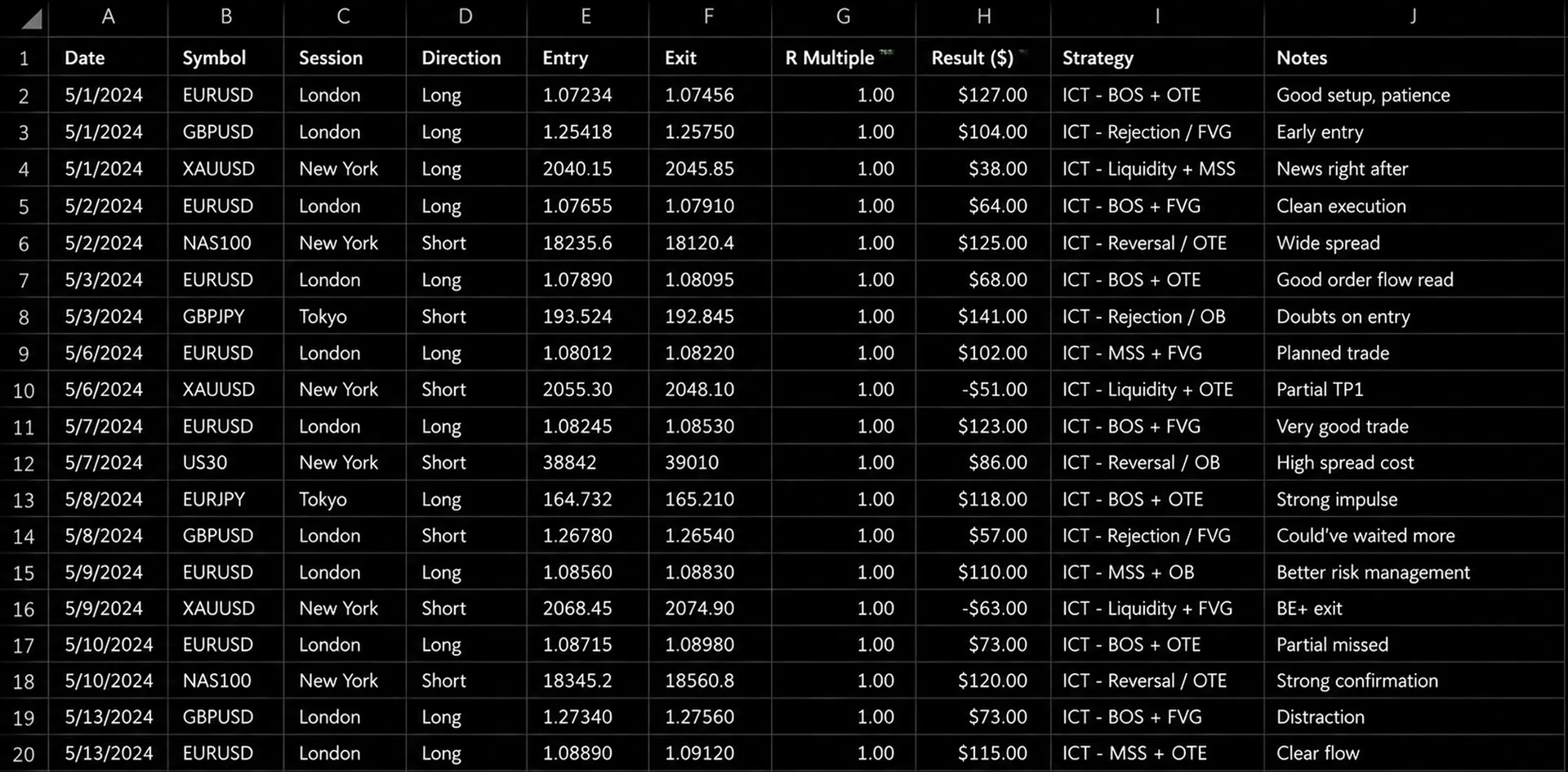

Notion and Excel trading journal templates are still the most common $0 starting point. You can download a free template, clone a Notion dashboard, or build your own columns for setups, risk, emotions, and R-multiples. There is no SaaS fee, no free-tier trade cap, and no vendor lock-in on day one. Our score: 6.0 / 10.
The cost is time. You maintain formulas, paste broker CSVs, fix broken charts, and rebuild views when your process changes. Templates are excellent for learning what to track. They get painful once you want auto-sync, PnL calendars, multi-account analytics, or backtesting without babysitting a sheet every night.
- Strength: Truly free and fully customizable fields, tags, and dashboards
- Strength: Works offline in Excel / Google Sheets and flexibly in Notion
- Trade-off: Manual entry and formula maintenance eat review time
- Trade-off: No broker auto-sync, trade replay, or product support by default
- Skip if: You already know you want automatic imports and ready-made analytics
What traders say: There is no single Trustpilot page for “Notion trading journal,” but community feedback is consistent. Beginners like the control and $0 cost. Active traders eventually complain that CSV pasting, broken formulas, and missing PnL calendars eat the review session. A common pattern: start in Notion or Excel, prove the habit, then move to a dedicated free journal when the sheet becomes the bottleneck.
Notion / Excel cost snapshot. Template price and SaaS add-ons vary by creator and plan.
| Option | Price | Best for |
|---|---|---|
| Free Excel / Google Sheets template | $0 | DIY journaling with full formula control |
| Free Notion template | $0 | Flexible dashboards without a journal SaaS fee |
| Paid Notion / Microsoft plans | Only if needed | Team sharing, larger workspaces, or Office features |
3. UltraTrader — Well optimized for mobile

UltraTrader is the best free trading journal on this list when you want polish, native iOS and Android apps, and a low paid upgrade. Basic is a real free forever plan with calendar, analytics, notes, filtering, and CSV export. Our review score: 7.6 / 10.
Free still has limits: one portfolio, no broker auto-connections, capped live trades and alerts, and no backtesting or trade replay on any plan. Premium is about $19/mo for multi-connection automation, more portfolios, Telegram, and image uploads. That price undercuts most $30–$80/mo suites.
- Strength: Usable free analytics plus native mobile apps
- Strength: Premium stays cheap versus heavy all-in-one journals
- Trade-off: Free has no auto-sync; Premium unlocks the automation most active traders want
- Trade-off: No backtesting or trade replay; Trustpilot sample is still small
- Skip if: Practice tools and replay are part of your weekly process
What reviews say: On Trustpilot, UltraTrader recently sits around 4.4 / 5, but from only ~11 reviews, so the average can swing fast. Positive comments usually highlight UI cleanliness, crypto import quality, and price. Lower feedback more often mentions sync friction on specific brokers (including MT5 in some app-store comments). App Store and Google Play ratings look stronger in volume — still verify your broker on the free plan before upgrading.
Full write-up: UltraTrader review.
UltraTrader pricing snapshot. Confirm live rates before you buy.
| Plan | Price | Best for |
|---|---|---|
| Basic | $0/mo | Casual journaling with core analytics |
| Premium | $19/mo | Auto-sync, multi-portfolio, and Premium extras |
2. TradesViz — Best free trading journal for deep analytics

TradesViz is the free pick when you care more about analytics depth than a minimal UI. Basic is free forever (about €0), with a usable stocks-focused lane and roughly 3,000 executions per month on free. Multi-asset desks usually need Pro or Platinum. Our review score: 7.5 / 10.
Pro starts around €17/mo and Platinum around €25/mo. That is strong value if you will actually use the charts, custom dashboards, and import breadth. Week one can feel heavy: the UI is powerful and crowded, so free is best treated as a serious evaluation, not a five-minute demo.
- Strength: Deep analytics and custom views for the price
- Strength: Broad imports once you move past the free stocks focus
- Trade-off: Steeper learning curve and a denser interface
- Trade-off: Easy to overbuy features you never open after upgrading
- Skip if: You want the simplest free trading journal UI on day one
What reviews say: On Trustpilot, TradesViz usually sits around 4.3 / 5 with roughly 90+ reviews. Five-star reviews often praise analytics depth and support. Lower ratings more often mention setup friction, import issues, and a steep learning curve. The pattern matches the product: excellent once configured, frustrating when week one goes sideways.
Full write-up: TradesViz review.
TradesViz pricing snapshot. Confirm live rates before you buy.
| Plan | Price | Best for |
|---|---|---|
| Basic (Free) | €0 forever | Stock traders testing the habit (~3,000 executions/mo) |
| Pro | €17/mo (or €161/year) | Multi-asset traders who need serious analytics |
| Platinum | €25/mo (or €233/year) | Power users (sims, max stats, advanced AI) |
1. Tradespad — Best overall free trading journal in 2026
Tradespad is our #1 best free trading journal for traders who want a clean daily review habit and a path into TradingView-tied backtesting without paying suite prices on day one. The free plan is $0/mo forever: enough to log trades, build a process, and decide whether journaling sticks. Our score: 9.0 / 10.
Free is capped on purpose: one trading account, no auto-sync, limited automatic analytics, and limited backtesting sessions. That is still more honest than “free” trials that expire before you finish a month of data. Basic starts at $19/mo ($17/mo yearly) when you need more accounts, auto-sync, and deeper workflows.

- Strength: Clean interface that stays readable after a full trading day
- Strength: Real free forever plan plus journaling and backtesting in one product path
- Strength: Integrations with main platforms on paid plans without $35–$99/mo suite pricing
- Trade-off: Free skips auto-sync and multi-account scale by design
- Best if: You want the best free trading journal software to start, then upgrade only when the habit is proven
What traders say: Early user feedback on Tradespad keeps circling the same points: clear design that is not confusing like denser journals, and a better daily habit than maintaining Notion or Excel by hand. Traders who left spreadsheet templates often call the jump a game changer for review consistency. As with any newer product, confirm your broker path on the free plan before you lock a paid upgrade.
Start free on Tradespad pricing and upgrade only when account count or auto-sync becomes the bottleneck.
Tradespad pricing snapshot. Confirm live rates on the pricing page.
| Plan | Price | Best for |
|---|---|---|
| Free | $0/mo | Starting the daily journal habit (1 account, no auto-sync) |
| Basic | $19/mo ($17/mo yearly) | More accounts, auto-sync, and deeper workflows |
| Early access | $19/mo for life (promo) | Unlimited accounts and early features while the offer lasts |
Which free trading journal should you pick?
Match the free trading journal to your market and habit before you upgrade.
| If you… | Start with | Why |
|---|---|---|
| Want the best overall free journal + backtesting path | Tradespad | Clean daily workflow and clear $19 upgrade |
| Need deep analytics and can learn a denser UI | TradesViz | Strong free analytics ceiling |
| Want a free journal well optimized for mobile | UltraTrader | Native apps and cheap Premium |
| Want zero SaaS cost and full DIY control | Notion / Excel | Free templates, you own the workflow |
| Trade stocks/ETFs and want a familiar brand | Tradervue | Free stocks lane still exists |
Best free trading journals compared
Use this side-by-side table to compare free limits, paid entry price, mobile, auto-sync, backtesting, and public reviews before you commit a week of trades to one tool.
Full comparison of the best free trading journals in this guide. Prices and Trustpilot figures are snapshots and can change.
| Journal | Our score | Free plan | Paid from | Mobile | Auto-sync on free | Backtesting | Public reviews |
|---|---|---|---|---|---|---|---|
| Tradespad | 9.0 / 10 | $0/mo (1 account) | $19/mo | Web-first | No | Limited on free | Strong early user praise for clarity vs Notion |
| TradesViz | 7.5 / 10 | €0 (~3,000 executions/mo, stocks focus) | €17/mo | Web | Limited / stocks focus | Analytics-heavy; not replay-first | ~4.3 / 5 · ~90+ Trustpilot |
| UltraTrader | 7.6 / 10 | $0/mo (1 portfolio, no auto-sync) | $19/mo | Native iOS + Android | No | No | ~4.4 / 5 · ~11 Trustpilot |
| Notion / Excel | 6.0 / 10 | $0 templates | - | Apps exist; journal is DIY | No | Manual only | Community: great to start, painful at scale |
| Tradervue | 7.0 / 10 | $0 (stocks/ETFs + import cap) | $29.95/mo | No strong native app | Limited | No | ~2.4 / 5 · ~10 Trustpilot |
A best free trading journal only works if you open it after losing days. Log last week’s trades on the free plan or template, tag setups for seven sessions, and only then pay for auto-sync or deeper analytics. If the free tier already exposes your process gaps, the paid tier will not magically fix them.
For most discretionary traders in 2026, Tradespad is the clearest #1 free starting point. TradesViz is the runner-up when analytics depth matters more than simplicity. UltraTrader is well optimized for mobile. Notion and Excel templates stay the best DIY free lane. Tradervue remains useful for stocks and ETFs. Start free, verify your broker or CSV path, and keep the subscription decision until the habit is real.
If you're looking for the best journaling and backtesting software, Tradespad is for you.
Try for freeFrequently Asked Questions Common searches: best free trading journal, free forever plans, Notion/Excel templates, stocks vs multi-asset, mobile apps, backtesting, and how to choose before upgrading.
Tradespad ranks #1 in our 2026 best free trading journals list with a 9.0 / 10 score for a usable free forever plan, a clean daily review workflow, and a clear upgrade into backtesting without suite-tier prices. TradesViz is #2 for analytics depth, and UltraTrader is #3 for mobile polish and value.
A free trading journal is software or a template that lets you log trades, tags, notes, and performance stats without a paid subscription. The best free forever apps still have limits such as account count, auto-sync, or market coverage. Notion and Excel templates are also free, but you maintain the formulas and data entry yourself.
In this guide, Tradespad, TradesViz, UltraTrader, and Tradervue offer real free forever plans. Notion and Excel templates are a free DIY lane with no SaaS fee. TradeZella, TraderSync, and Edgewonk are strong paid journals, but they are trial-only or paid-only, so they do not rank here. If you want a free TradeZella alternative, start with Tradespad.
Yes, if you want zero SaaS cost and full control over fields and dashboards. Notion and Excel templates are the best free DIY trading journal option in this list. They stop being worth it when manual entry and broken formulas take more time than reviewing trades — then move to a dedicated free plan.
Beginners usually do best with Tradespad or a simple Notion/Excel template. Tradespad is the clearer overall free app if you want analytics without building formulas. A template is fine for learning what to track, then switch once the habit is proven.
UltraTrader is the best free trading journal in this ranking when native iOS and Android apps matter most. Its free Basic plan still includes usable analytics, while Premium at about $19 / mo unlocks broker auto-connections and higher live-trade limits.
Yes. Tradespad offers a free forever plan with a limited backtesting path. Notion and Excel templates can track backtest results manually, but they do not replace chart replay software. If practice tools matter, start with Tradespad’s free plan instead of a live-only free journal.
Paid journals are worth it when the free cap blocks your real process: auto-sync, multiple accounts, multi-asset imports, or deeper analytics. Start free for at least one week of real trades. Upgrade only after the journaling habit is proven and a specific free limit is the bottleneck.
Free plan limits, template quality, and paid upgrades change often. Always verify the live free tier or template before you commit weekly journaling habits to any workflow.