Prop firm buyer's guide · Updated October 2026
Best 8 trading journals for prop firm traders in 2026. A practical comparison of journaling software for challenge, evaluation, and funded accounts: multi-account tracking, risk visibility, imports, analytics, and who each tool is actually for.
Prop firm traders do not just need a trade log. They need separate accounts for each evaluation or funded account, clear visibility into risk and drawdown-style habits, fast imports from platforms like MT5, Tradovate, or TradeLocker, and a review loop that survives rule pressure. This guide compares eight journals through that lens, not as generic stock diaries.
Last updated
Oct 20, 2026
Platforms reviewed
8 journals
Pricing checked
Oct 20, 2026
Methodology
Public docs & pricing
Platforms reviewed:








We build Tradespad, so we have a commercial interest in this comparison. The pricing and feature facts below still come from public vendor materials. Prop firm rules, account restrictions, and sync eligibility vary by firm. Always confirm before connecting a challenge or funded account.
Why prop firm traders need a different journal
A prop firm journal still records entries, exits, size, P&L, notes, and screenshots, but the job expands. You often run several evaluations or funded accounts at once, each with daily loss, max drawdown, consistency, or news rules. Mixing those accounts in one undifferentiated log hides the exact account that failed.
The best journals for prop traders make multi-account tracking easy, keep risk context visible, and reduce friction after a live session so review still happens when you are tired. Auto-sync or CSV from platforms like MT5, Tradovate, cTrader, or TradeLocker matters when you cannot afford to skip logging.
Backtesting and replay help before and after you pay for an evaluation: practice execution on charts, then journal live challenge trades in the same product. Journaling will not pass a prop firm for you. It makes rule breaks, overtrading, and weak setups measurable so you stop paying for the same mistake.
Quick comparison for prop traders
Snapshot of popular trading journals for prop workflows: price, free plan, sync, analytics, and backtesting.
Pricing and features checked: October 20, 2026
| Trading journal | Best for | Starting price | Free plan | Auto-sync | Analytics | Backtesting | UI Design |
|---|---|---|---|---|---|---|---|
| Tradespad | Multi-account prop journaling + TV backtesting | From $0 | Yes | Yes (+650 brokers) | Yes | With TradingView charts from $0 | Clean and minimalist interface |
| TradeZella | Suite depth + prop expense tracking | From $35/mo | No | Yes (500+ brokers) | Yes | Yes (From $29/month) | Clean but a bit too dense |
| TraderSync | Broad sync + coaching on paid tiers | From $29.95/mo | No | Yes (+400 brokers) | Yes | Limited / paid focus | Feels dense and outdated |
| TradesViz | Dense stats on a budget | From $0 | Yes | Yes (+250 brokers) | Yes | Simulators (paid) | Super dense |
| Tradervue | Clean reports (stocks-first free tier) | From $0 | Yes | Yes (+80 brokers) | Yes | Not a focus | Clean and easy to understand |
| Edgewonk | Psychology under rule pressure | About $197/year | No | Yes (+200 brokers) | Yes | Not a focus | Clean and easy to understand |
| Trademetria | Import-led reporting | From $19.95/mo | Yes | Yes (+20 brokers) | Yes | Limited | Clean but a bit outdated |
| StonkJournal | Free manual log while on challenge | From $0 | Yes | No | Yes | No | Dense and outdated |
Pricing and feature availability can change. Verify current pricing on each provider's website before purchasing.
Best trading journal for prop firm use cases
Category picks for challenge and funded traders. Match the label to how you run accounts, then read the full profile below.
Best overall for prop traders
Tradespad
Clean multi-account journaling, analytics, and TradingView Charts backtesting with a real free plan, useful while you are still paying for evaluations.
Best for futures prop firms
Tradespad or TradeZella
Prioritize Tradovate-style sync, account separation, and review after each session. Tradespad if you want a lighter free entry; TradeZella if you want a denser paid suite.
Best for stacking eval & funded accounts
Tradespad or TradeZella
Tradespad keeps multiple evaluations and funded accounts organized without suite bloat. TradeZella adds suite tools and prop-oriented expense tracking on paid plans.
Best free journal during a challenge
Tradespad or StonkJournal
Keep evaluation fees for the firm, not the journal. Tradespad adds free chart backtesting; StonkJournal is stronger for unlimited manual logging only.
Best for post-breach forensics
TradesViz or TraderSync
Dense filters help you see which sessions, symbols, or size mistakes threaten daily loss and drawdown rules.
Best for discipline under prop rules
Edgewonk
Behavioral stats and custom metrics matter when tilt, revenge trades, and size creep blow evaluations.
Best to practice before buying an eval
Tradespad
TradingView Charts backtesting on the free plan lets you validate execution habits before another reset fee.
Best for forex/CFD prop desks
Tradespad or TradeZella
Look for MT5/cTrader/TradeLocker-style imports plus session analytics. Tradespad for a cleaner free path; TradeZella for broader paid connectors and AI.
Best simple log on a tight budget
StonkJournal
Generous free manual journaling if auto-sync and backtesting are not required yet.
The best trading journals for prop firm traders in 2026
Eight actively maintained journals reviewed for prop-relevant workflows: account separation, imports, analytics, pricing, and tools such as backtesting or replay. We did not invent hands-on prop-firm certifications.
1.Tradespad: Best lighter journal for prop account stacking
Best for multi-account prop journaling + chart practice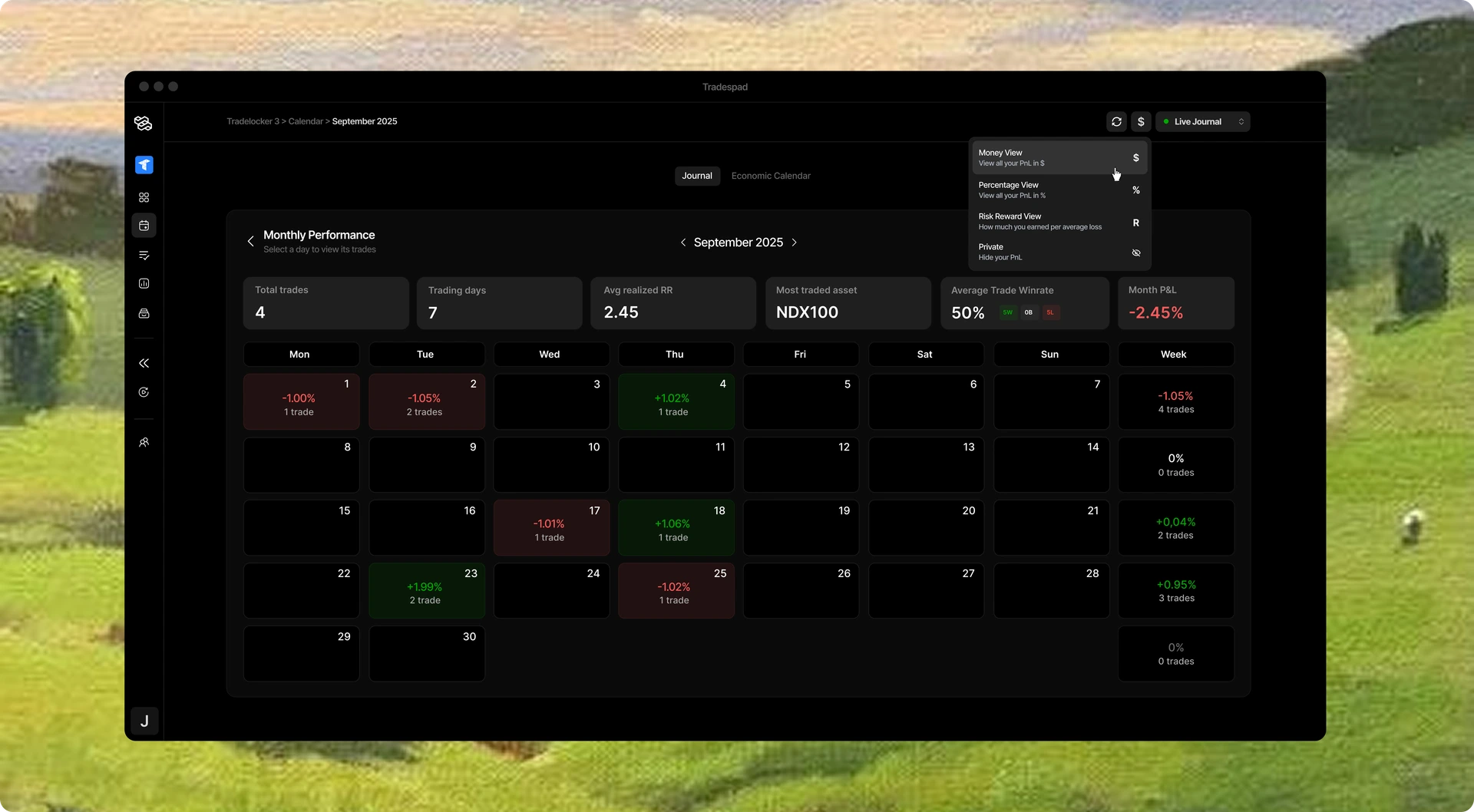
Tradespad combines journaling, analytics, multi-account tracking, broker/platform integrations, and TradingView Charts backtesting. For prop traders it fits when you want separate tracking for evaluations and funded accounts, a review habit you will keep, and free chart practice between challenge fees, without paying suite prices on day one.
- Starting price
- From $0
- Free plan
- Yes
- Auto-sync
- +650 brokers
- Markets
- Multi-asset
- Backtesting
- TradingView charts
- Learning curve
- Easy
- Mobile App
- App available soon
- Best suited for
- Prop multi-account + chart practice
Strengths
- Real free forever plan useful while paying for evaluations
- Clean multi-account organization for challenge vs funded accounts
- TradingView Charts backtesting to practice before the next reset
- Core analytics without forcing a dense AI suite
Limitations
- Newer brand than Tradervue/TradeZella
- Free plan caps accounts and auto-sync by design
- Not the densest prop-expense or AI suite if that is your only filter
Free $0 · Basic from about $19/mo · Pro from about $29/mo (confirm live pricing).
Consider Tradespad if you run multiple prop accounts and want journaling plus chart backtesting without suite bloat. Look elsewhere if you need the widest paid connector list or dedicated prop expense tooling as the product.
2.TradeZella: Best dense suite for prop desks that will pay
Best for suite + AI + prop expense workflows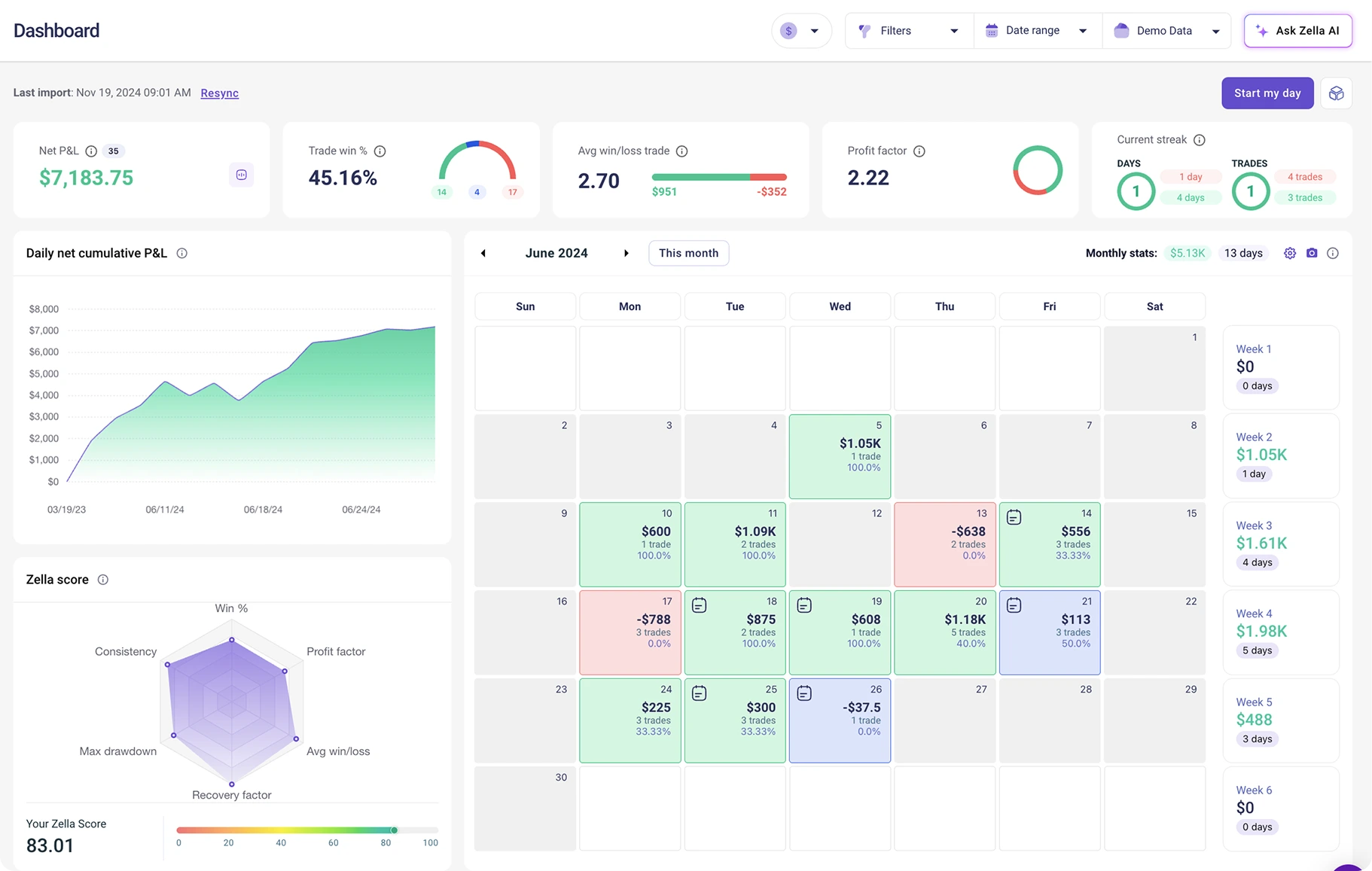
TradeZella is an all-in-one suite with broad imports, dense analytics, replay, backtesting, and AI tools. Prop traders who want one paid subscription covering advanced review and features such as prop-oriented expense tracking often land here if $35 to $100/mo is acceptable.
- Starting price
- From ~$35/mo
- Free plan
- No
- Auto-sync
- +500 brokers
- Markets
- Multi-asset
- Backtesting
- Manual + automated
- Learning curve
- Medium
- Mobile App
- Yes
- Best suited for
- Paid prop suite buyers
Strengths
- Large list of broker integrations
- Deep reports, replay, and AI agents on higher tiers
- Manual and automated backtesting options by plan
Limitations
- No permanent free plan
- Higher monthly cost if you only need a journal/backtesting software
- Denser UI with a steeper learning curve
Essential ~$35/mo, Pro ~$59/mo, Ultra ~$99/mo. Confirm on TradeZella.
Choose TradeZella when suite depth and prop extras justify the monthly cost. Skip it if you mainly need a light multi-account journal while burning evaluation fees.
3.TraderSync: Best premium analytics if sync breadth is the filter
Best for import breadth + coaching stack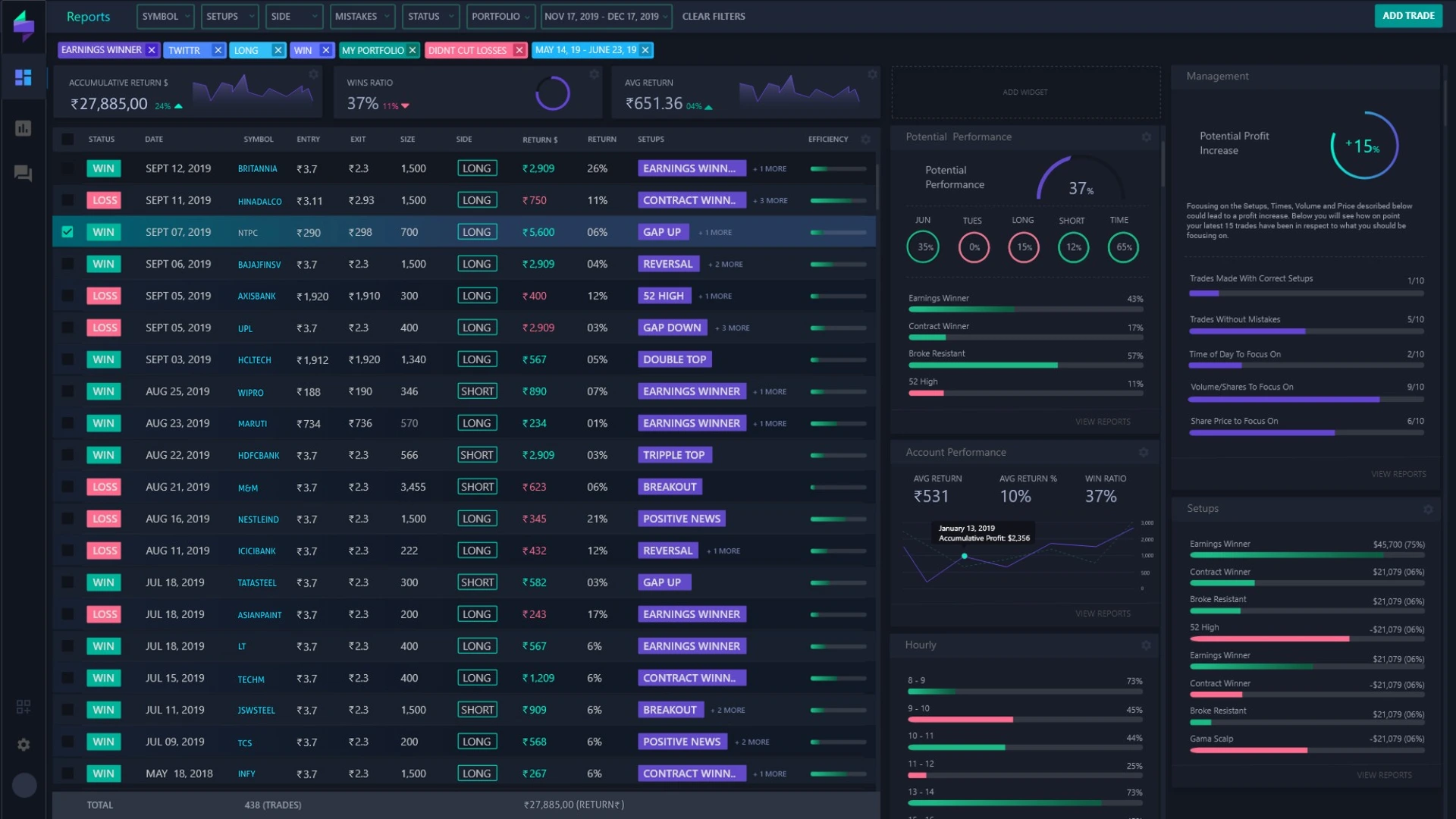
TraderSync targets traders who want wide import coverage, dense analytics, and AI coaching on higher plans. Prop users should weigh connector breadth against the lack of a forever-free tier while challenge costs already add up.
- Starting price
- From ~$29.95/mo
- Free plan
- No
- Auto-sync
- +400 brokers
- Markets
- Multi-asset
- Backtesting
- Yes
- Learning curve
- Hard
- Mobile App
- Yes
- Best suited for
- Paid sync + coaching desks
Strengths
- Broad broker support
- Deep analytics and coaching features on higher tiers
- Trade replay for session review
Limitations
- No permanent free plan
- Monthly cost climbs quickly on Premium/Elite
- Heavier product than a minimal daily journal
Pro ~$29.95/mo, Premium ~$49.95/mo, Elite ~$79.95/mo (annual discounts vary). Confirm on TraderSync.
Fit if paid coaching and import breadth are mandatory. Look elsewhere for a free habit while on evaluation.
4.TradesViz: Best budget analytics depth for rule forensics
Best free/low-cost stats depth for prop review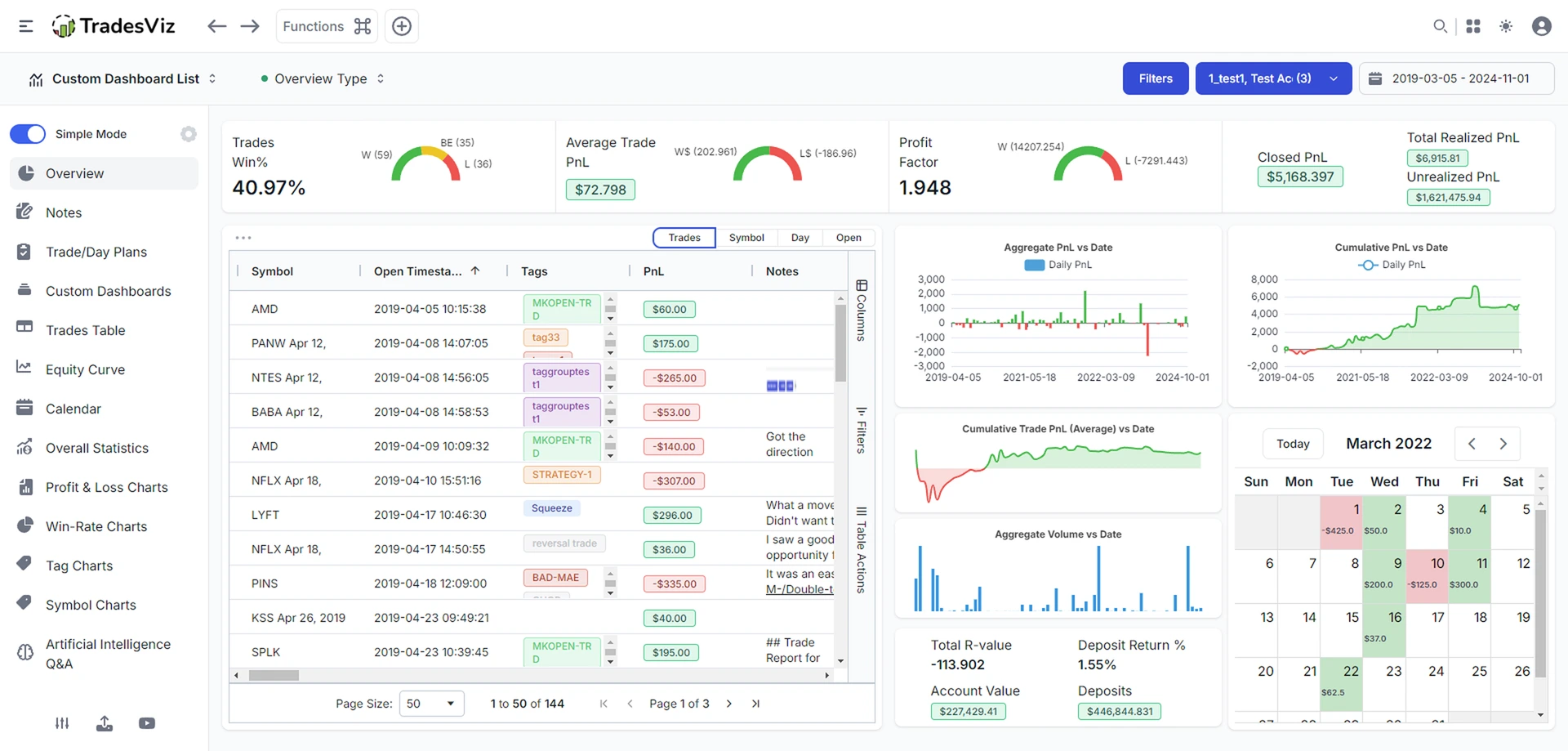
TradesViz is strong when dense analytics matter more than a minimal UI. Prop traders use that depth to filter losing sessions and size mistakes, but should confirm multi-asset and sync limits on free vs paid tiers.
- Starting price
- From $0
- Free plan
- Yes
- Auto-sync
- +250 brokers
- Markets
- Stocks free focus; multi-asset paid
- Backtesting
- Simulators on paid
- Learning curve
- Hard
- Mobile App
- Web-first
- Best suited for
- Stats-heavy prop reviewers
Strengths
- Real free plan with meaningful analytics
- Very deep custom dashboards and stats
- Competitive paid pricing vs $35-$99 suites
Limitations
- Steeper learning curve and denser UI
- Setup/import friction shows up in public reviews
- Free limits push active multi-asset desks to paid
Free forever · paid plans roughly high-teens to ~$30/mo range depending on tier/billing. Confirm on TradesViz.
Pick TradesViz for analytics density per dollar. Skip if you need the lightest post-session UI on a funded account.
5.Tradervue: Best familiar reports (less ideal for multi-asset props)
Best classic reports; stocks-first free tier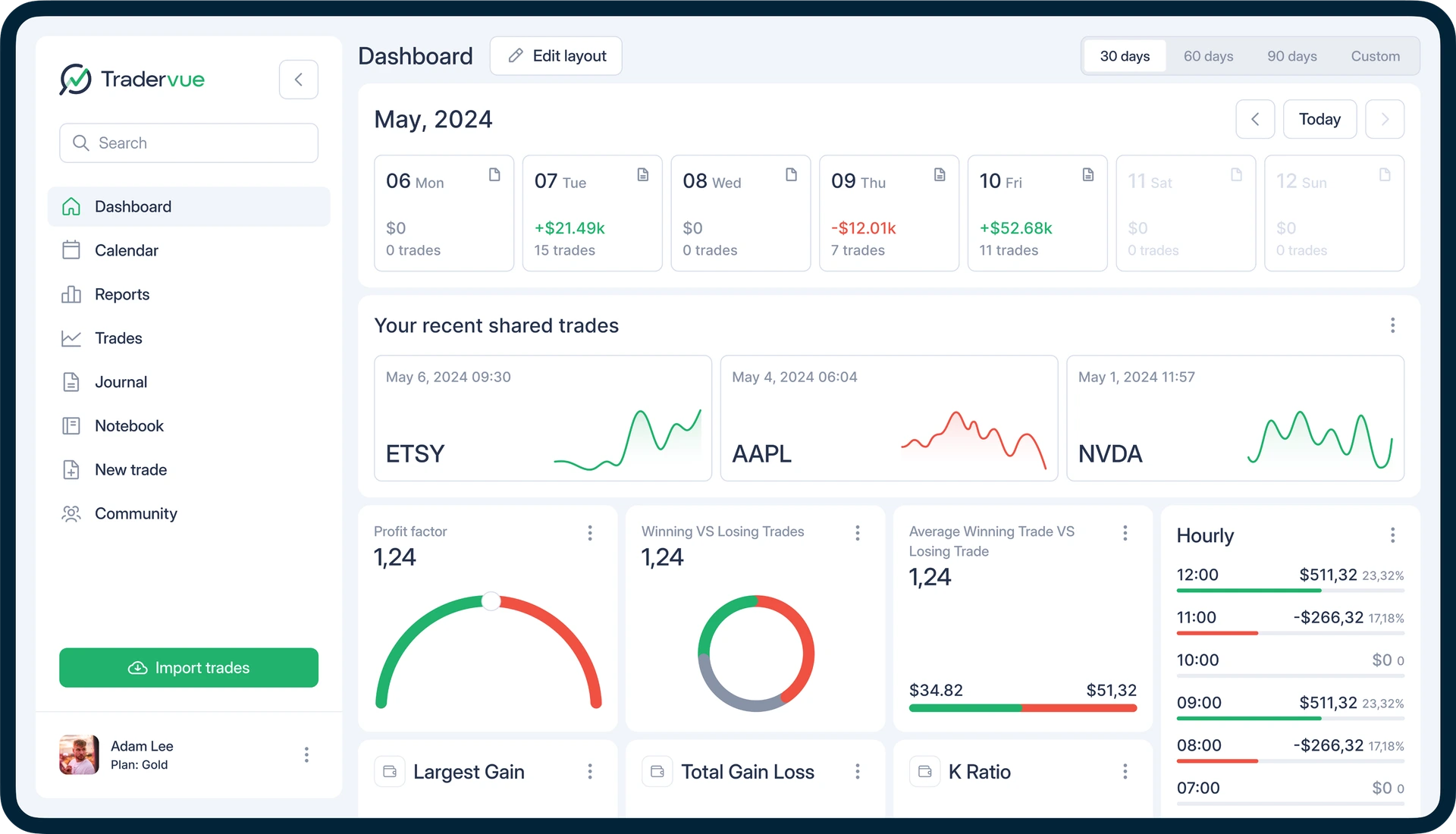
Tradervue remains a clean reporting journal with mentoring workflows. Prop traders on futures/forex usually need paid tiers and should verify whether account and asset limits match challenge/funded accounts.
- Starting price
- From $0
- Free plan
- Yes
- Auto-sync
- +80 brokers
- Markets
- Stocks/ETFs free focus
- Backtesting
- No
- Learning curve
- Easy
- Mobile App
- No
- Best suited for
- Report-led reviewers
Strengths
- Real free plan for stocks/ETFs
- Clean report layouts and mentoring use cases
- Long track record in retail journaling
Limitations
- Free limits and asset coverage constraints
- Paid Silver/Gold feel pricey vs newer journals
- No backtesting, and some customer service complaints
Free limited · Silver ~$29.95/mo · Gold ~$49.95/mo. Confirm on Tradervue.
Good if you already live in Tradervue reports. Less ideal as a free multi-asset prop stack with modern chart backtesting.
6.Edgewonk: Best psychology journal under prop rule pressure
Best psychology-first annual journal for discipline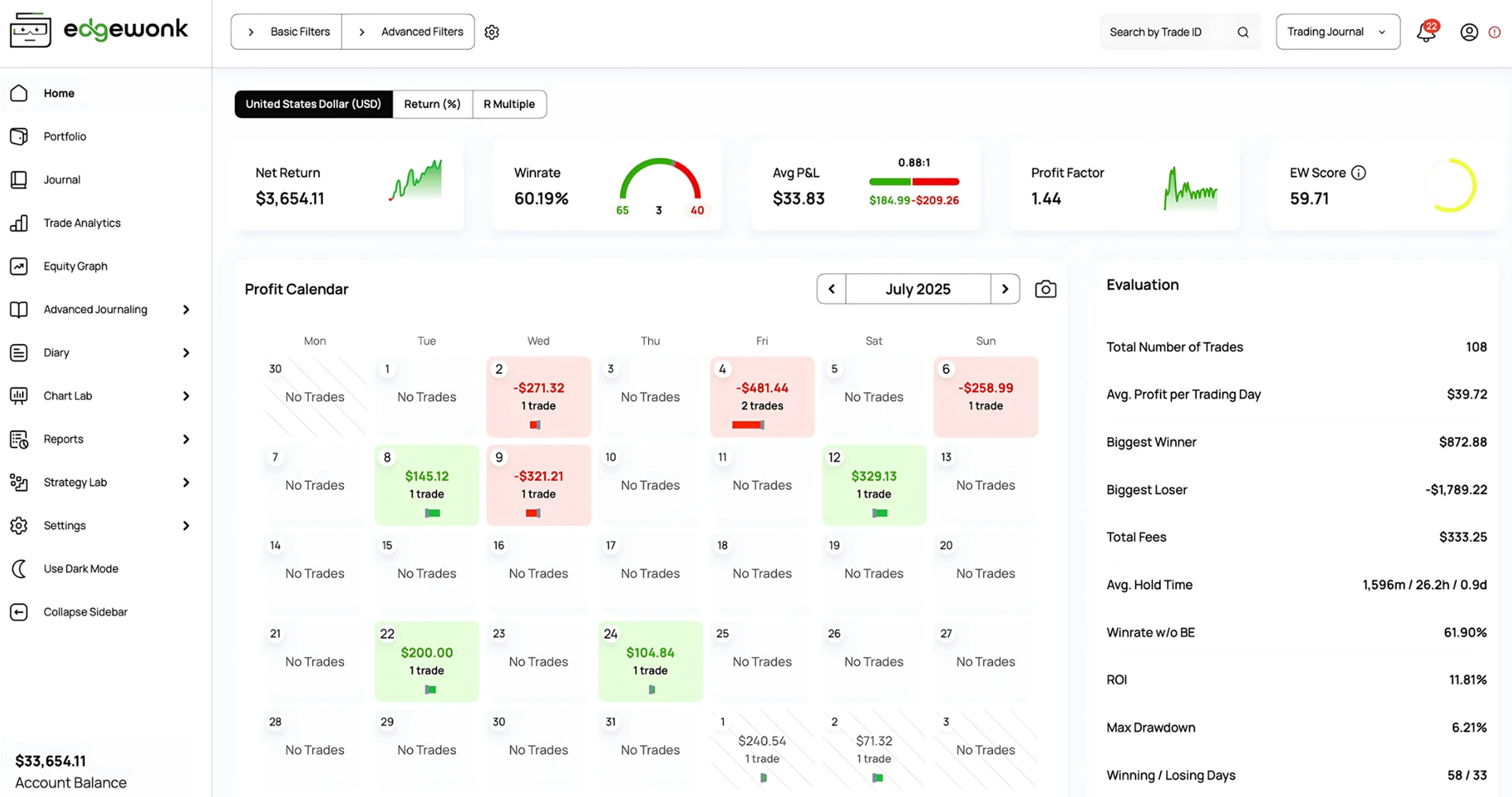
Edgewonk focuses on behavioral tracking and custom statistics. That maps well to prop failure modes (tilt, revenge size, and broken process) if you will tag consistently and accept annual billing without a free tier.
- Starting price
- ~$197/year
- Free plan
- No
- Auto-sync
- +200 brokers
- Markets
- Major assets
- Backtesting
- No
- Learning curve
- Medium
- Mobile App
- No
- Best suited for
- Discipline-focused prop traders
Strengths
- Strong psychology and custom metric workflows
- One annual price unlocks the product
- Good fit for deliberate strategy review
Limitations
- No free plan, only annual billing
- Less auto-sync breadth than suite leaders
- Not built around TradingView Charts backtesting
About $197/year. Confirm on Edgewonk.
Choose Edgewonk for psychology depth. Choose another tool if free entry, multi-account sync, or chart backtesting is mandatory during challenges.
7.Trademetria: Best classic import + reports option
Best import-led reporting without suite narrative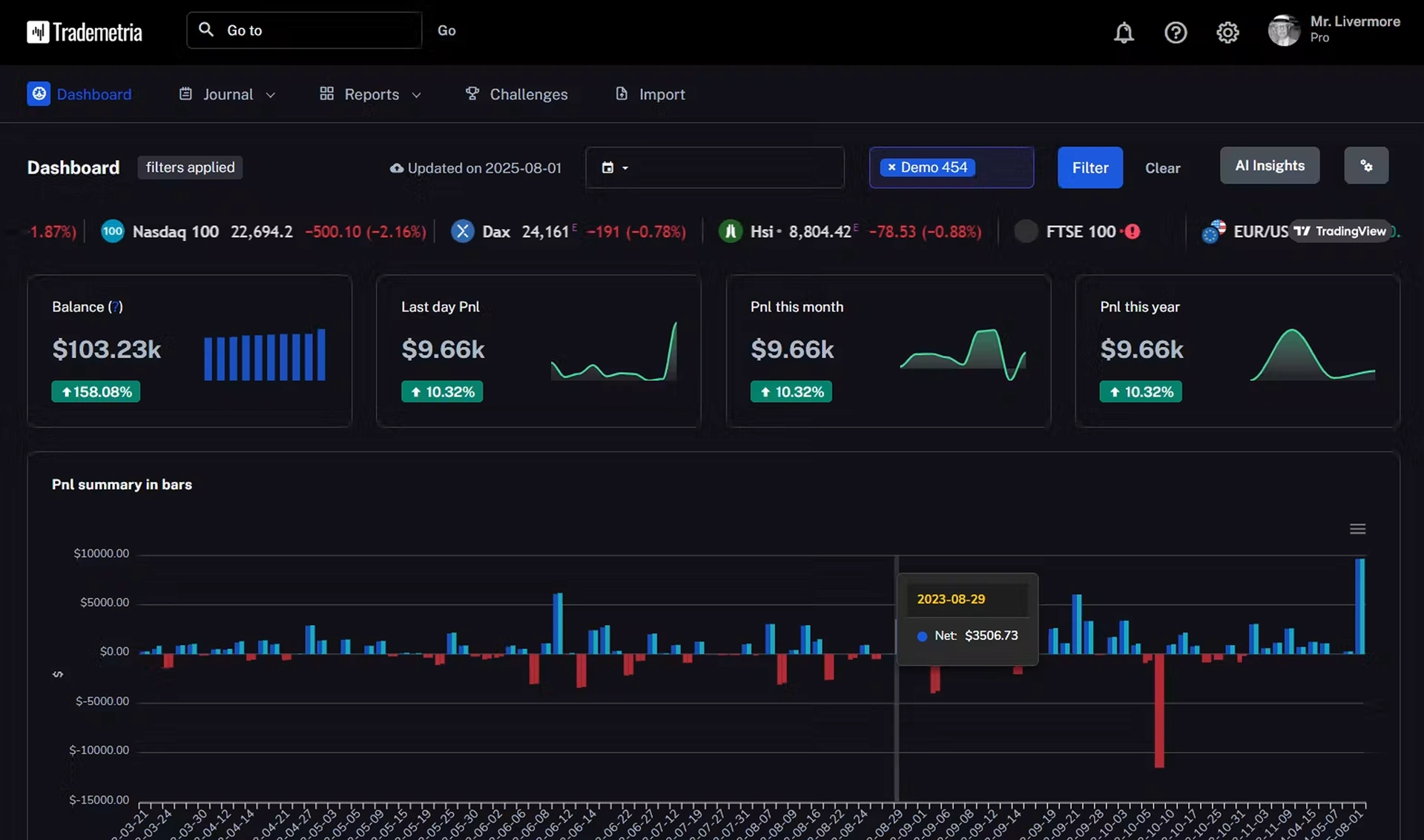
Trademetria fits prop traders who mainly want structured imports and reports. Confirm current free limits, integrations, and whether multi-account workflows match how you stack evaluations.
- Starting price
- From ~$19.95/mo
- Free plan
- Yes
- Auto-sync
- +20 brokers
- Markets
- Multi-asset
- Backtesting
- No
- Learning curve
- Medium
- Mobile App
- No
- Best suited for
- Import + report prop workflows
Strengths
- Long-standing reputation built over many years
- Lower entry than top-tier suites
- Useful if reporting is the main job
Limitations
- No backtesting
- Fewer broker integrations than top competitors
Paid plans from roughly ~$19.95/mo historically. Confirm live on Trademetria.
Consider if reports are enough. Look elsewhere for free forever journaling plus chart backtesting between evaluations.
8.StonkJournal: Best free manual journal while on a challenge
Best free unlimited manual log on a budget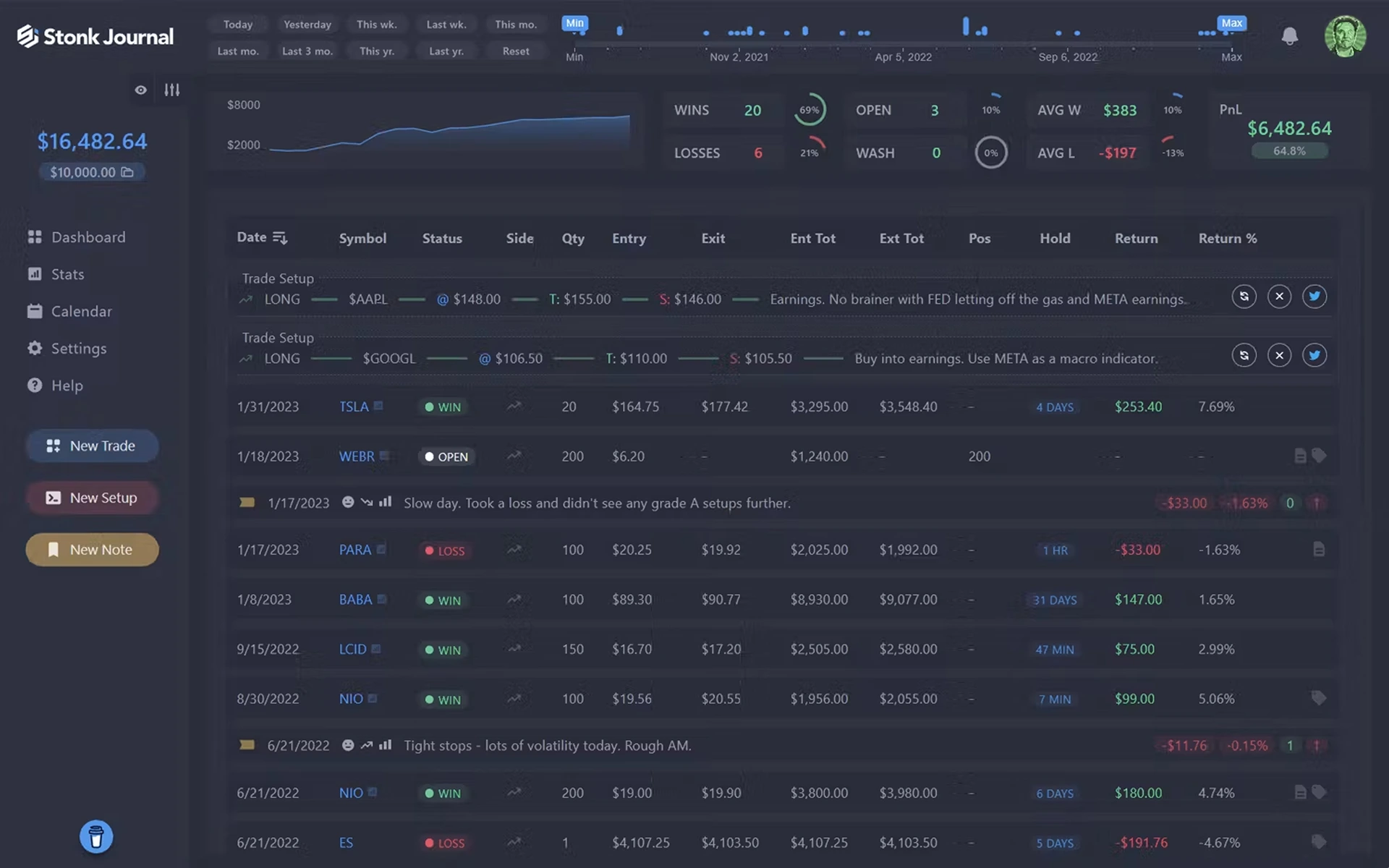
StonkJournal is compelling when evaluation fees leave little room for software. Unlimited manual logging and risk/rules tooling help the habit; it is not a backtesting or auto-sync platform.
- Starting price
- From $0
- Free plan
- Yes
- Auto-sync
- No
- Markets
- Multi-asset multipliers
- Backtesting
- No
- Learning curve
- Medium
- Mobile App
- No
- Best suited for
- Free challenge journaling
Strengths
- Generous free journaling without trade caps
- Simpler than more expensive journals
- Pro adds CSV import and AI coaching around ~$10/mo
Limitations
- No built-in chart backtesting
- No trade auto-sync option
- Less ideal if TradingView backtesting is required
Free · Pro about $10/mo. Confirm on StonkJournal.
Great free habit on a tight prop budget. Pair elsewhere, or choose Tradespad, if auto-sync or TradingView backtesting matters before the next eval.
What makes a good trading journal for prop firm traders?
Use these criteria when you are on a challenge or funded account. Depth without a daily habit still fails.
1. Multi-account / evaluation vs funded separation
Separate eval, funded, and personal accounts so P&L and risk never blur across firms or stages.
2. Trade import & platform sync
Auto-sync or CSV from MT5, Tradovate, TradeLocker, cTrader, and similar stacks. Friction after a prop session decides whether logging happens.
3. Risk & drawdown visibility
Daily loss, R-multiples, size, and streak patterns that mirror how prop rules actually fail traders.
4. Performance analytics
P&L, win rate, expectancy, and breakdowns by symbol, session, and strategy, filterable per account.
5. Strategy & rule tags
Tag setups, news days, and rule-adjacent behaviors so you can see what threatens consistency or max loss.
6. Trade review loop
Notes, screenshots, and a clear pre/post review path you can finish after a funded session.
7. Backtesting before the next fee
Practice on historical charts so you do not buy another evaluation to “figure it out live.”
8. Trade replay (when available)
Rebuild how a trade unfolded when you need context beyond fills, especially after a breach day.
9. Psychology under pressure
Emotion, confidence, and discipline tags that connect tilt to failed days on prop rules.
10. Asset & prop platform coverage
Futures, forex/CFD, and the platforms your firm actually allows, plus investor/read-only sync practices where required.
11. Ease of use after live trading
If the UI is too heavy, you will skip review on the days that matter most.
12. Price vs evaluation spend
Judge journal cost against challenge fees. A free or cheap tier that you use beats an unused $99 suite.
Feature comparison for prop-oriented journaling
Text values only. Confirm live plan limits and whether your prop firm allows a given sync method before purchasing.
Pricing & access
| Feature | Tradespad | TradeZella | TraderSync | TradesViz | Tradervue |
|---|---|---|---|---|---|
| Starting price | From $0 | From ~$35/mo | From ~$29.95/mo | From $0 | From $0 |
| Free plan | Yes | No | No | Yes | Yes (limited) |
| Annual option | Yes | Yes | Yes | Yes | Often monthly focus |
Trade capture
| Feature | Tradespad | TradeZella | TraderSync | TradesViz | Tradervue |
|---|---|---|---|---|---|
| Manual entry | Yes | Yes | Yes | Yes | Yes |
| CSV import | Yes | Yes | Yes | Yes | Yes |
| Automatic broker sync | +650 brokers | +500 brokers | +400 brokers | +250 brokers | +80 brokers |
Journaling & Analytics
| Feature | Tradespad | TradeZella | TraderSync | TradesViz | Tradervue |
|---|---|---|---|---|---|
| Trade notes | Yes | Yes | Yes | Yes | Yes |
| Strategy Checklist | Yes | Yes | Yes | Yes | Limited |
| Screenshots | Yes | Yes | Yes | Yes | Yes |
| P&L Calendar | Yes | Yes | Yes | Yes | Yes |
| TradingView Entry/Exit | Yes | Yes | Yes | Yes | Yes |
| Trade Replay | Yes | Yes | Yes | No | No |
| Filtered analytics | Yes | Yes | Yes | Yes | Yes |
Backtesting
| Feature | Tradespad | TradeZella | TraderSync | TradesViz | Tradervue |
|---|---|---|---|---|---|
| Backtesting available | Yes | Yes | Yes | Yes | No |
| TradingView charts | Yes | Yes | Yes | No | No |
| Manual backtesting | Yes | Yes | Yes | Simulators (paid) | No |
| Automated backtesting | No | Yes | No | No | No |
| Included on free plan | Yes | No | No | No | No |
| Prop firm simulator | Yes | Yes | No | No | No |
Prop firm journal vs Excel or Google Sheets
Spreadsheets are flexible and free. Dedicated journals win when you stack evaluations, need screenshots, or want analytics without rebuilding filters after every breach.
| Capability | Spreadsheet | Dedicated trading journal |
|---|---|---|
| Setup time | Yes | No |
| Manual trade entry | Yes | Yes |
| Automatic imports | No | Often yes |
| Automatic analytics | No | Built-in |
| Strategy filtering | No | Built-in |
| Screenshots | Usually no | Yes |
| Multiple accounts | No | Built-in |
| Backtesting | No | Depends on platform |
| Maintenance | High | Lower |
Sheets can still work for a single low-volume challenge. Move to software when account count, imports, or review speed becomes the bottleneck, especially once you are paying repeated evaluation fees.
Benefits of journaling on prop accounts
Why prop traders still need a review habit: clearer account-level memory, faster diagnosis after a breach, and less guesswork before the next evaluation fee.
- Keeps challenge and funded accounts separate so results do not blur
- Shows which setups, sessions, and size choices threaten prop rules
- Surfaces tilt patterns like revenge trades and overtrading after losses
- Turns review into a habit on the days you are most tempted to skip it
- Stores screenshots and notes with the exact account that produced them
- Connects live journaling with practice/backtesting in the same product when available
How we evaluated journals for prop firm traders
We used publicly documented pricing, product pages, integration docs, and feature lists. Prop-specific claims (account stacking, expense tools, simulators) were checked against vendor marketing where available. We did not invent firm-by-firm sync certifications.
- Multi-account / evaluation & funded support
- Trade import / automation for prop platforms
- Risk and analytics depth
- Strategy and behavior tracking
- Backtesting / replay for pre-eval practice
- Futures, forex/CFD, and platform coverage
- Psychology tools under rule pressure
- Ease of use after live sessions
- Pricing vs evaluation spend
- Prop-oriented extras (expenses, simulators) when documented
Pricing and feature availability were checked on October 20, 2026. Prop firm rules and third-party sync policies change frequently. Verify current pricing, plan limits, and whether your firm allows the integration before connecting.
Keep exploring
Frequently asked questions. Straight answers for prop firm traders comparing journaling software.
It depends on budget and stack, but Tradespad is a strong default if you need multi-account journaling, analytics, and TradingView Charts backtesting, including a free plan while you pay for evaluations. TradeZella fits if you want a denser paid suite with prop-oriented extras.
Prop rules fail specific accounts for daily loss, drawdown, consistency, or news trades. A journal that separates accounts and tags process mistakes makes those patterns visible before the next reset fee.
Tradespad is a strong free pick when you want journaling plus TradingView Charts backtesting at $0. StonkJournal is another solid free option for unlimited manual logging without backtesting or auto-sync.
Yes. Choose a journal with clear multi-account support. Tradespad is built for organizing multiple accounts so evaluation and funded P&L stay separate. Confirm account limits on your plan.
At minimum: account name/stage, entry/exit, size, P&L, setup tags, risk, and notes about rule-adjacent decisions (size creep, news, revenge trades). Add screenshots and emotions as the habit sticks.
Yes if you will use a paid all-in-one suite, broad sync, and prop-oriented extras such as expense tracking. If you mainly need a lighter multi-account journal and free backtesting, Tradespad is usually the better starting point.
Prioritize futures-aware imports, account separation, and drawdown-style review. Tradespad fits clean multi-account futures journaling with chart practice; TradeZella if AI and suite depth are worth $35 to $100/mo.
Look for MT5/cTrader/TradeLocker-style imports plus session analytics. Tradespad is a strong lighter option with chart practice; broader paid suites help if connector coverage is your only filter.
Only if your firm allows the method you use. Many firms restrict third-party tools or prefer read-only/investor passwords. Verify the firm rules before syncing, and never share credentials that violate their policy.
Backtesting cannot guarantee a pass, but it helps you practice execution and size habits before paying for another challenge. Tradespad includes TradingView Charts backtesting on the free plan for that loop.
Yes for very low volume. Move to dedicated software when you stack accounts, need screenshots, or spend more time maintaining sheets than reviewing trades. Tradespad is built for that upgrade path with a free tier.
A simulator mimics challenge rules on historical or practice data. A journal records your live evaluation or funded trades and behavior. Some products include both; journals remain essential once you are trading a real challenge account.
Some suites market prop expense tracking (for example TradeZella on paid plans). Most journals focus on trade P&L and accounts. If expense ledgers are mandatory for you, verify that feature on the vendor site before subscribing.
No. A journal does not pass evaluations for you. It makes process mistakes measurable so you stop repeating the behaviors that fail daily loss, drawdown, and consistency rules.
Ready to journal your prop firm path?Track challenge and funded accounts, review risk habits, and practice on TradingView charts in one platform.
Tradespad publishes this comparison and also offers a trading journal. Tradespad is not affiliated with, endorsed by, or sponsored by the other platforms or prop firms named here. Features, limits, pricing, and prop firm rules can change. Confirm live plans and whether your firm allows third-party tools before connecting an account. This is educational, not financial advice.